Microsoft Entra ID Hardening: Privileged Identity Management (PIM) with Terraform

Florian Heinen
August 14, 2026
⏳ 13 min
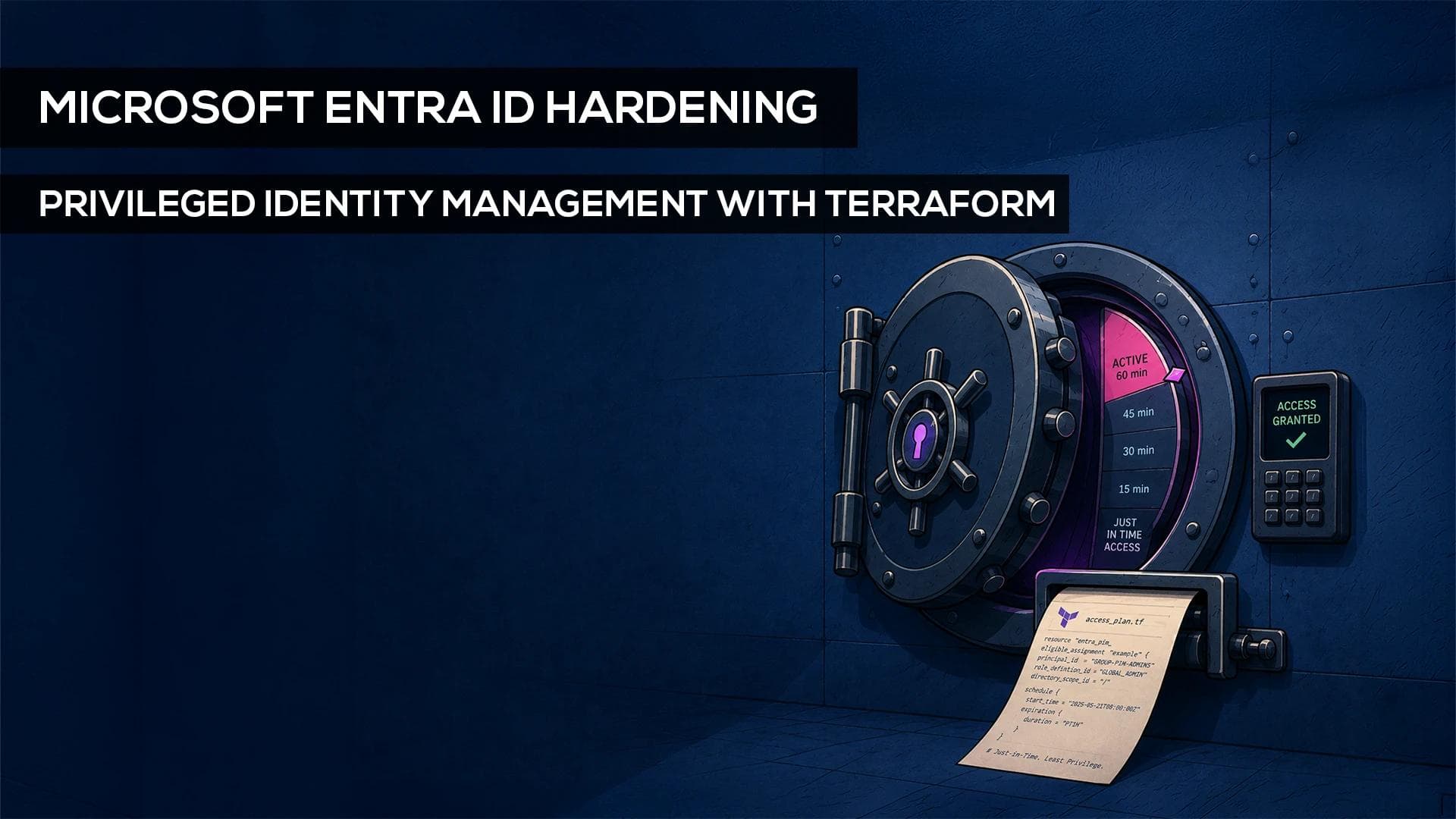
Microsoft Entra Privileged Identity Management (PIM) has become a best practice for managing privileged Entra roles. It allows privileged access to be granted when needed and for a limited period of time, following the principles of Least Privilege and Just-in-Time Access.
Microsoft Entra Privileged Identity Management (PIM) has become a best practice for managing privileged Entra roles. It allows privileged access to be granted when needed and for a limited period of time, following the principles of Least Privilege and Just-in-Time Access.
But PIM configurations can also turn into portal sprawl. At shiftavenue, this is where we use Terraform by HashiCorp as an Infrastructure as Code (IaC) approach: instead of managing groups, permissions and policies purely by clicking through the portal, we define the core PIM desired state as code.
In this article, I’ll walk through the theoretical and practical foundation of such a setup: from the Terraform structure and role-assignable groups to PIM assignments, resilient break-glass accounts and a controlled GitOps workflow with GitHub.
What does Terraform add to the PIM Setup?
Mit diesem Ansatz lebt die PIM-Konfiguration nicht mehr nur im Portal. Änderungen am Sollzustand werden im Code versioniert, vor der Umsetzung reviewed und später mit Terraform auf Abweichungen geprüft.
Die eigentliche Aktivierung privilegierter Rollen bleibt dabei weiterhin Aufgabe von Microsoft Entra PIM.
Prerequisites for the PIM Setup
Before we get into the Terraform configuration itself, a few basics need to be in place.
Tools & Licenses
- License: Microsoft Entra ID P2 or Microsoft Entra ID Governance for using PIM.
- Terraform: The Terraform CLI, either locally or within the pipeline.
- Provider: HashiCorp’s official azuread provider.
- Repository: GitHub for code, version history and, later on, the GitOps workflow.
Pipeline Identity & Permissions
Terraform needs its own workload identity with the Microsoft Graph permissions required for the resources it actually manages. That sounds straightforward, but it is one of the most sensitive parts of the entire setup. Since this identity is highly privileged itself, we do not grant broad permissions just in case.
For certain operations on role-assignable groups, for example, RoleManagement.ReadWrite.Directory is relevant.
For GitHub Actions, we use OpenID Connect or Workload Identity Federation. This allows the pipeline to operate without a long-lived Azure client secret stored in the repository and use short-lived tokens instead.
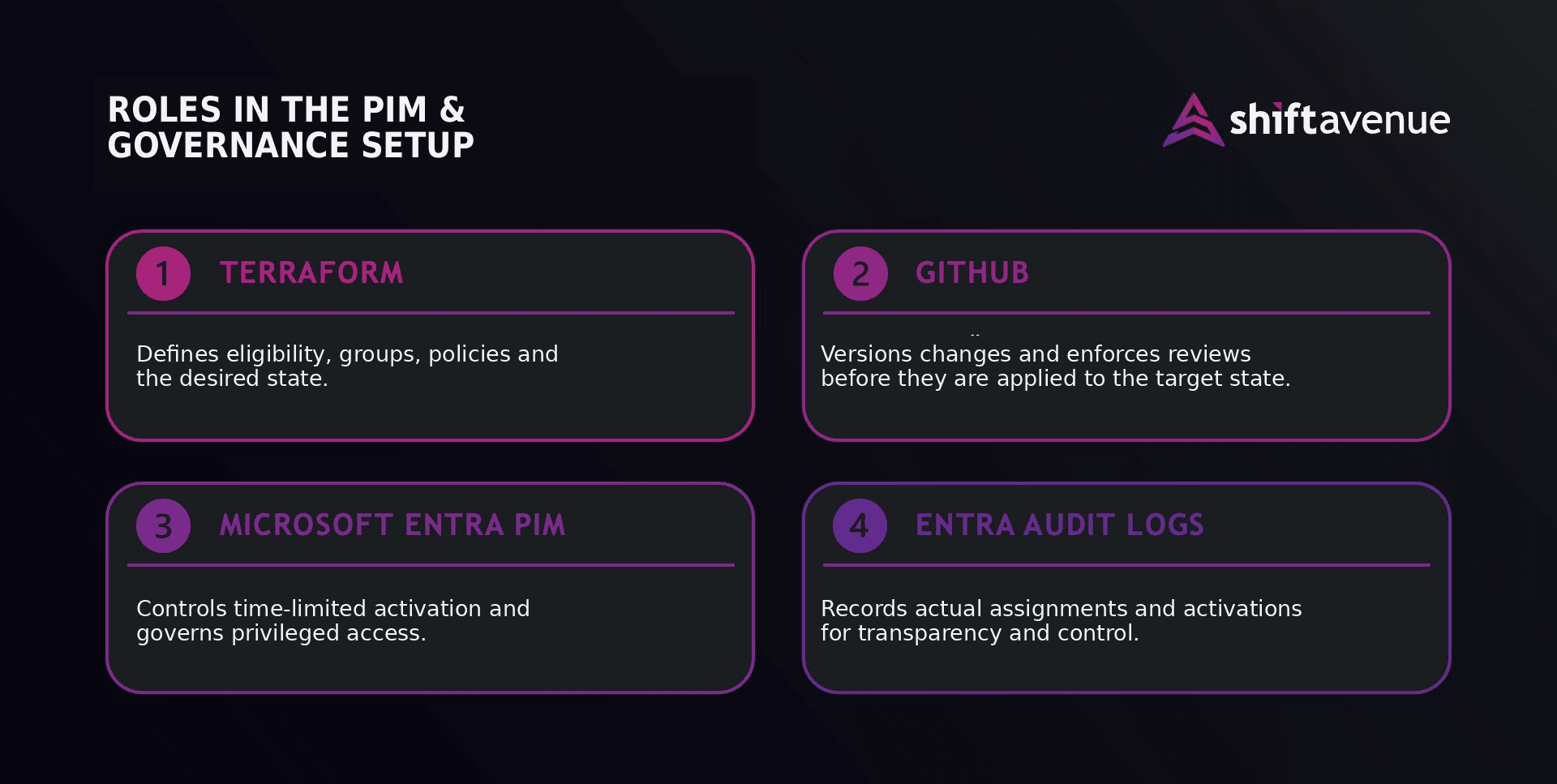
Infographic 1: Terraform structure, remote state and managed Entra ID resources.
Structure matters: Project Layout & State File
A clean setup starts with a well-thought-out project structure. Instead of putting the entire Terraform configuration into one huge main.tf, I split the individual areas so that groups, PIM assignments, policies, Emergency Access and backend configuration remain separate, traceable and easy to review.
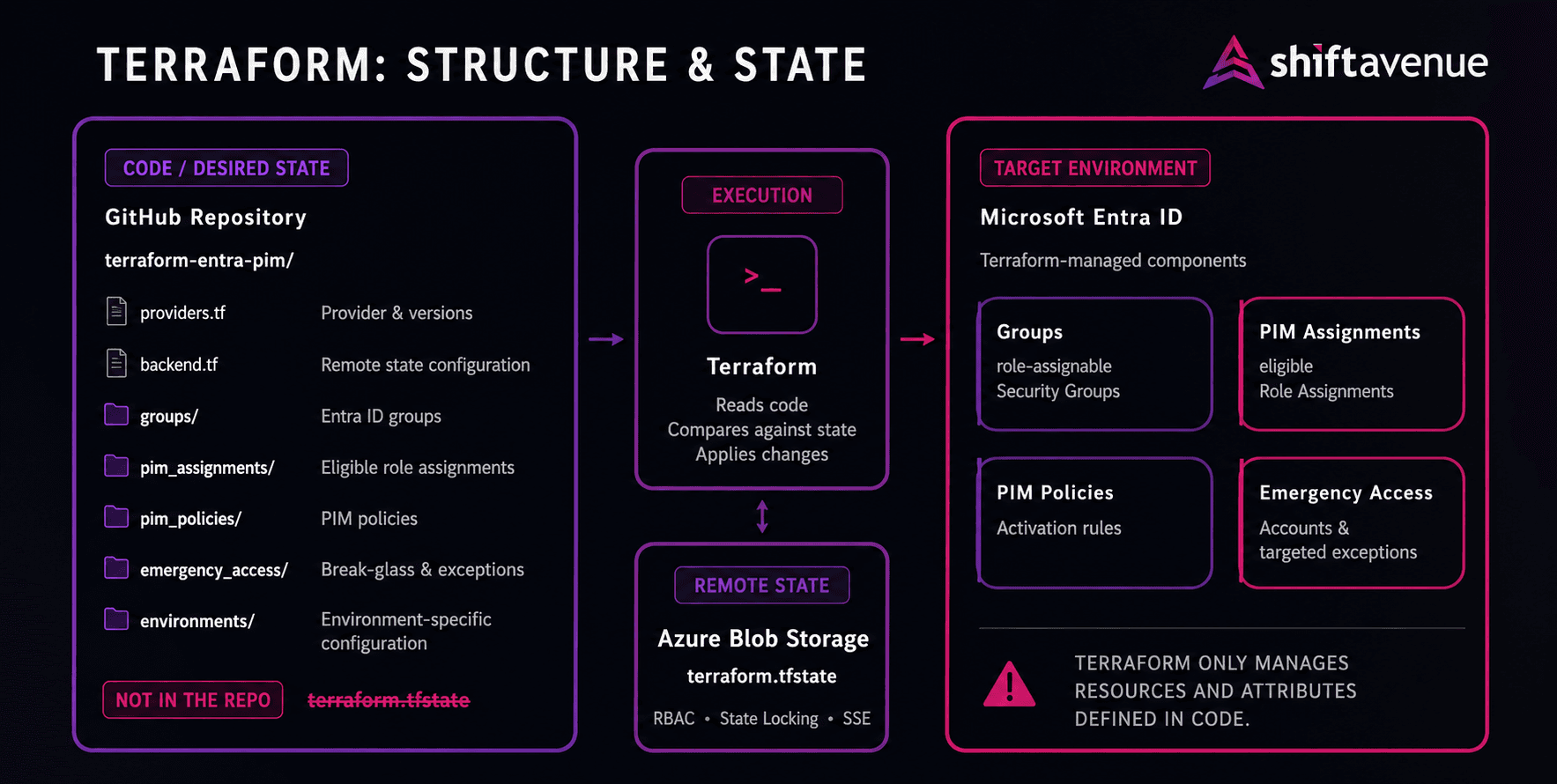
Infographic 2: Terraform Structure & State Management
💡More on this: Rightsizing your Terraform Modules, my colleague @Rene Schach’s live session at HashiDays London on building structured, maintainable Terraform modules.
Just as important is how you handle the Terraform state file. It is Terraform’s “memory”: it connects the resources defined in code with the actual objects in the tenant and may contain sensitive information.
That is why the state belongs neither in the Git repository nor unprotected on a local machine. For this setup, I use Azure Blob Storage as a remote backend. Access controls, encryption and state locking keep the state protected in a central location and prevent multiple processes from writing to it at the same time.
In short:
Kurz gesagt:
The code belongs in the repository. The state does not.
Creating and managing Entra ID groups
Instead of assigning privileged roles directly to individual users, we manage access in this setup through so-called role-assignable groups. The relevant users are added to the group, while the role assignment itself is managed centrally at group level. This makes access management easier to understand and simplifies lifecycle management.
For a group to be assigned a Microsoft Entra role, it has to be role-assignable. In Terraform, we create a security group and set the following flag:
assignable_to_role = true
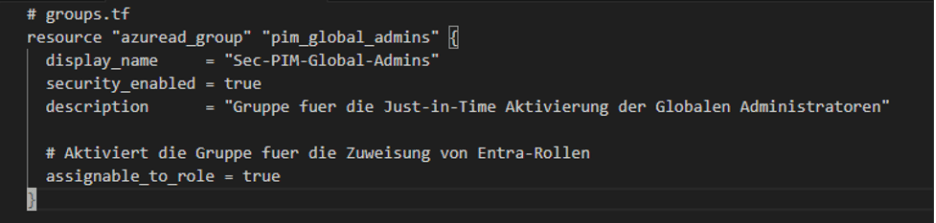
Screenshot 1: Role-assignable Entra ID Group in Terraform
One important distinction: PIM for Groups does not inherently require a role-assignable group. We need this property in our setup because the group itself is being linked to a Microsoft Entra role.
Linking PIM to Entra ID groups
Once the group is in place, the actual PIM assignment comes next. Using the azuread provider, we create an eligible role assignment for the group we defined earlier. This establishes the underlying eligibility to activate a role temporarily when needed.
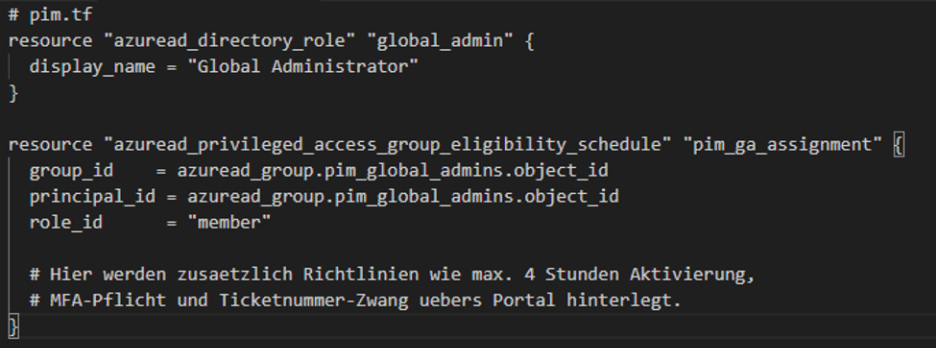
Screenshot 2: PIM-Assignment for an Entra ID Group with Terraform
This gives us a clean separation between two things:
Terraform defines the underlying eligibility. PIM controls the actual activation.
The Safety Net: Break-Glass Accounts with Terraform
What happens if PIM fails, the regular authentication path is unavailable or our CI/CD pipeline breaks? For exactly these scenarios, we need break-glass account, genuine emergency admin accounts.
Where it makes sense, we also represent these in Terraform in our breakglass.tf. The accounts are deliberately not managed through PIM and instead receive a permanent Global Administrator role assignment. Microsoft recommends having at least two independent accounts for this purpose.
To build a resilient safety net, we follow Microsoft’s recommendations for Emergency Access:
Redundancy & domain choice: We create at least two independent Emergency Access accounts. They are cloud-only, use the original *.onmicrosoft.com domain and depend on neither on-premises synchronization nor external federation. If the regular authentication path fails, an independent way into the tenant remains available.
Exclusion from blocking policies: The accounts must be excluded from Conditional Access policies that could block or restrict sign-in during an emergency. Depending on the setup, this may also include risk-based Conditional Access rules.
We therefore use Terraform to define the account objects, permanent role assignments and specific policy exclusions in code. The actual credentials, however, are deliberately created outside this Terraform configuration and stored securely, for example in an Azure Key Vault.
The reason remains important, but needs a little nuance: sensitive values can end up in Terraform state or plan files. Newer Terraform versions provide mechanisms such as Ephemeral Values and Write-only Arguments that can keep certain values out of them. However, this only works where the respective resource and provider support those mechanisms.
For the absolute worst-case scenario, cloud-only storage is not enough anyway.
Resilience note: If the identity infrastructure itself is no longer accessible or trustworthy, we need an independent way back into the tenant. This is why we use phishing-resistant authentication methods such as FIDO2 security keys. At least one of these keys, together with the required emergency information, belongs completely offline in a secure location, if necessary, quite literally in a physical safe.
Governance matters here as well: break-glass accounts are not meant for day-to-day work. Every sign-in should therefore trigger an immediate, high-priority alert, for example via email, SMS or the SIEM/SOC. We also regularly verify that the accounts would still work in an actual emergency; Microsoft recommends validating them at least every 90 days.
The “immutable” Approach: Managing PIM via GitHub
Now for the magic: in GitOps terms, we treat our PIM setup as “immutable”. Changes to the defined desired state should go through code rather than being made ad hoc in the Entra ID portal.
Technically, however, Entra ID does not block manual portal changes. That is why we add drift detection: a regularly scheduled terraform plan compares the resources managed by Terraform with our defined desired state. Manual deviations therefore become visible no later than the next run.
Connecting this to GitHub and GitHub Actions gives us our GitOps workflow:
- A colleague or group needs eligibility for a new admin role going forward. The change is prepared in the Terraform code on a separate branch.
- A pull request is opened.
- The GitHub Action runs terraform plan and makes the result available directly in the pull request for review.
- A senior admin or security owner reviews the code under the four-eyes principle and approves the request.
- Once the change is merged into the main branch, terraform apply runs and the approved change is implemented in Entra ID.
To make sure this process does not rely purely on voluntary discipline, mandatory reviews and status checks can be enforced for the main branch. For the deployment itself, a protected GitHub environment can also prevent the person who initiated a change from approving their own deployment.
Practical tip for emergencies (on-call):
A question that comes up frequently is: “What happens if I’m on call at night, dealing with a critical incident and need admin rights immediately? Who is going to approve my pull request in the middle of the night?”

On-Call at 3 AM, the approver is fast asleep.
The reassuring answer: nobody has to.
Role activation does not require a new pull request.
The GitOps workflow only controls the underlying permission: the eligibility.
Once the team or on-call group has been made eligible via code, engineers can activate their role during an incident, including at night, through the regular Entra ID PIM portal, including MFA and justification. No code change, Git interaction or pipeline wait time required.
The exact activation steps depend on the PIM policy in place. In addition to MFA and justification, this may include a ticket number or approval by a designated approver.
GitHub and Terraform only come back into play when the underlying permission structure itself needs to change.
Of course, this approach can also be integrated into existing ITSM processes with Jira or ServiceNow. Change management then runs through the respective third-party system, while the approval from step 4 can be linked to the existing change process.
Conclusion: The Foundation for holistic Entra Hardening
With this setup, we have not only represented PIM in a structured way as code, but also established a traceable change process through GitHub or the connected change management system. The actual role assignments and activations remain traceable in Microsoft Entra.
And PIM is only the beginning. Once central parts of the identity infrastructure are defined as code, Entra ID hardening can be expanded step by step.
Depending on the setup, the same Terraform foundation can also cover areas such as:
- Conditional Access Policies: Roll out conditional access policies in a version-controlled, reviewable way. The azuread provider supports them directly.
- Risk-based Conditional Access: User and sign-in risk signals from Microsoft Entra ID Protection can feed directly into Conditional Access policies. This is also the relevant long-term path: Microsoft is retiring the existing legacy risk policies in Entra ID Protection on October 1, 2026.
- Administrative Units: Deliberately scope administrative responsibilities within the tenant. Administrative Units can also be managed through the azuread provider.
- App Registrations & Enterprise Applications: Manage applications and service principals as code in a standardized way.
Not just for Microsoft: The principles behind Infrastructure as Code, GitOps and version-controlled governance are not limited to Entra ID. What matters is whether the respective platform provides a suitable API or a reliable Terraform provider. For this article, I deliberately chose Microsoft Entra ID as the practical example.
Want to put this concept into practice in your own environment? In our Terraform IaC Workshop, we build a production-ready Terraform foundation together with your team that you can continue to maintain and extend independently.